

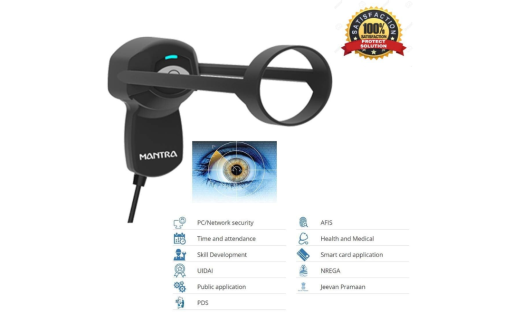
Mantra MFS100 Fingerprint Scanner
Mantra MFS100 Fingerprint Scanner: Complete Guide, Features, Uses & Buying Information
Aaj ke digital time mein biometric authentication ka use banking, government services, attendance systems, e-KYC, identity verification aur access control jaise kai areas mein hota hai. Mantra MFS100 Fingerprint Scanner ek popular USB fingerprint biometric device hai, jo fingerprint-based identification aur authentication ke liye use kiya jata hai.
Agar aap ek reliable fingerprint scanner ki तलाश में हैं, to Mantra MFS100 apni compact design, USB connectivity aur easy operation ke karan ek practical option ho sakta hai.
Mantra MFS100 Kya Hai?
Mantra MFS100 ek USB-based fingerprint scanner hai jo computer ya compatible system ke saath connect karke fingerprint capture karta hai. Iska use biometric applications mein user ki fingerprint identity verify karne ke liye kiya ja sakta hai.
Ye device offices, educational institutions, businesses, attendance systems aur various biometric applications mein use kiya jata hai.
Mantra MFS100 ke Main Features
-
USB connectivity
-
Compact aur easy-to-use design
-
Fingerprint image capture ke liye designed
-
Computer-based biometric applications ke saath use
-
Windows-based applications mein commonly used
-
Authentication aur identification applications ke liye suitable
-
Desktop aur office environments ke liye convenient
-
Installation ke baad simple fingerprint scanning process
Mantra MFS100 ka Use Kahan Hota Hai?
Mantra MFS100 ka use different applications mein kiya ja sakta hai, jaise:
1. Attendance System
Schools, colleges, offices aur businesses mein employee/student attendance ke liye fingerprint authentication systems ke saath biometric scanner ka use kiya ja sakta hai.
2. Biometric Authentication
Fingerprint ko user verification ke liye use karne wale applications mein MFS100 ek input device ke roop mein kaam karta hai.
3. Identity Verification
Jahan fingerprint-based identification ki requirement hoti hai, wahan compatible software ke saath fingerprint scanner ka use kiya ja sakta hai.
4. Access Control
Offices aur restricted areas mein biometric access-control systems ke saath compatible setup mein fingerprint scanner ka use kiya ja sakta hai.
5. Educational Institutions
Schools aur colleges mein attendance aur student identification systems ke liye biometric solutions deploy kiye ja sakte hain.
Mantra MFS100 Kaise Kaam Karta Hai?
MFS100 ko USB connection ke through compatible computer se connect kiya jata hai. Required driver/software install hone ke baad application fingerprint scanner ko detect kar sakti hai.
User apni finger scanner surface par place karta hai. Scanner fingerprint image capture karta hai, jise compatible biometric software further processing aur authentication ke liye use karta hai.
Mantra MFS100 L1 Hai Ya L0?
Yahan ek important point samajhna zaroori hai.
Mantra MFS100 ko MFS110 L1 jaise Aadhaar Registered Device (RD) products ke saath confuse nahi karna chahiye. MFS100 ka application aur compatibility us software/system par depend karta hai jahan ise use kiya ja raha hai.
Agar aapko specifically Aadhaar authentication ya RD-service based application ke liye biometric device chahiye, to purchase karne se pehle application ki current device requirement check karna zaroori hai.
MFS100 Aur MFS110 L1 Mein Difference
| Feature | Mantra MFS100 | Mantra MFS110 L1 |
|---|---|---|
| Product type | Fingerprint scanner | L1 biometric device |
| USB connectivity | Yes | Yes |
| Fingerprint authentication | Supported applications ke through | Supported applications ke through |
| RD requirement | Application dependent | L1/RD applications ke liye designed |
| Typical use | Biometric applications, attendance etc. | RD-enabled applications and authentication |
| Purchase se pehle | Software compatibility check karein | Required RD/application compatibility check karein |
Important: Device kharidne se pehle apne software/application ki exact biometric device requirement confirm karein.
Mantra MFS100 Kharidne Se Pehle Kya Check Karein?
Fingerprint scanner purchase karte waqt sirf product ka naam dekhna enough nahi hai. Ye points check karein:
-
Aapka software MFS100 support karta hai ya nahi.
-
Operating system compatibility.
-
Required driver/software availability.
-
Application ko L0, L1 ya RD device ki requirement hai ya nahi.
-
Product new hai ya refurbished.
-
Seller ki replacement/warranty policy.
-
Product ke saath required accessories available hain ya nahi.
Mantra MFS100 Kahan Se Kharidein?
Agar aap Mantra MFS100 Fingerprint Scanner purchase karna chahte hain, to Dhairya Enterprises se product availability aur current price check kar sakte hain.
Dhairya Enterprises biometric devices, fingerprint scanners aur related technology products ke liye product information aur online ordering facility provide karta hai.
👉 Product ki latest price, availability aur specifications ke liye website par product page check karein.
Frequently Asked Questions – Mantra MFS100
Kya Mantra MFS100 USB se connect hota hai?
Haan, MFS100 USB connectivity ke through compatible computer/system ke saath use kiya jata hai.
Kya MFS100 attendance ke liye use ho sakta hai?
Haan, agar aapka attendance software MFS100 ko support karta hai, to iska use fingerprint attendance system mein kiya ja sakta hai.
Kya MFS100 Aadhaar authentication ke liye use hota hai?
Aadhaar/RD-based applications ke liye device requirement application ke according hoti hai. Aise use case mein MFS100 aur L1 RD devices ko confuse nahi karna chahiye. Application ki current supported-device list check karein.
MFS100 aur MFS110 mein kya difference hai?
Dono alag biometric products hain. MFS110 L1 ko L1/RD-enabled applications ke liye design kiya gaya hai, jabki MFS100 ka use compatible biometric applications mein hota hai.
Kya MFS100 Windows computer par use kiya ja sakta hai?
Compatible driver aur application/software ke saath Windows computer par use kiya ja sakta hai. Exact Windows version compatibility purchase/use se pehle verify karna recommended hai.
Conclusion
Mantra MFS100 Fingerprint Scanner biometric applications ke liye ek practical USB fingerprint scanning solution hai. Attendance, identification, authentication aur other fingerprint-based applications mein iska use application compatibility ke according kiya ja sakta hai.
Agar aap MFS100 purchase kar rahe hain, to sabse important step hai ki jis software ya application mein device use karna hai, uski supported-device requirement pehle verify karein.
Latest price, availability aur product details ke liye Dhairya Enterprises ki website par product page check karein.
Dhairya Enterprises – With every delivery, we send not just a product — but Trust & Relationships. 🤝


Add comment
You must be logged in to post a comment.